
VPN for Grok and X AI: Access, Privacy, and Region Issues

Last updated: May 2026
Grok + X AI + VPN

VPN for Grok and X AI: Privacy, Travel Access and Network Blocks

Grok is xAI’s AI assistant and is closely connected to the X ecosystem. Some users access it from Grok.com, some use the Grok mobile app, and others use Grok through X. That makes access issues more confusing than a normal AI chat website.

A VPN may help in some cases, especially when the problem is public Wi-Fi, workplace filtering, school network blocks, travel routing, DNS filtering, visible IP location, or X/Grok access changing by region. But a VPN cannot guarantee Grok access, fix every app-store issue, change your X account status, or override xAI, X, app store, account, subscription, local law, or platform rules.

Quick answer
A VPN may help with Grok when the issue is public Wi-Fi, network filtering, DNS filtering, travel routing, or visible IP location.
Not guaranteed
Grok access may also depend on your X account, Grok account, app store region, subscription, payment, platform rules, and local restrictions.
Best use case
Using Grok safely on shared Wi-Fi, testing region errors, and troubleshooting X or Grok access while traveling.

If you use multiple AI platforms, start with our main guide to the best VPN for AI tools. If your main concern is privacy while using AI tools, read our guide to using a VPN for AI privacy. If Grok or another AI app shows an availability message, see AI Tool Not Available in Your Country.

Grok and X AI access with VPN privacy protection
A VPN may help test whether a Grok or X AI access issue is caused by network filtering, travel routing, DNS filtering, or visible IP location.

Quick Answer: Can a VPN Help With Grok?

Yes, a VPN may help with Grok when the issue is network-based. If Grok does not load on hotel Wi-Fi, airport Wi-Fi, a school network, a workplace network, a mobile carrier route, a library connection, or a public hotspot, a VPN can help you test whether the problem changes through another server.

A VPN is also useful for privacy. It helps protect the connection between your device and the VPN server and can hide your real IP address from websites.

But Grok access is not only about IP address. Depending on how you use it, access can involve Grok.com, the Grok iOS or Android app, X, your X account, subscription status, phone verification, payment or billing region, app store country, local laws, and platform rules.

A VPN can help with Grok network access and public Wi-Fi privacy, but it cannot guarantee Grok availability or override xAI, X, app store, account, subscription, payment, workplace, school, or local rules.

What Is Grok?

Grok is an AI assistant created by xAI. X’s help center describes Grok as an AI assistant available to X users and powered by xAI’s large language model. xAI’s privacy policy covers the Grok mobile app, Grok.com, and other xAI services.

That creates several possible access paths:

  • Grok through Grok.com
  • Grok through the iOS app
  • Grok through the Android app
  • Grok inside X
  • Grok-related features tied to X accounts or subscriptions
  • xAI developer or API access, where available

If one access path fails, another may behave differently. For example, a user may have a problem with the mobile app but not the web version, or with X access but not Grok.com.

Why Grok or X AI May Not Work

When Grok does not load, it is easy to assume the whole service is blocked. In reality, the issue may be much more specific.

Network filtering

Schools, workplaces, hotels, airports, libraries, and public Wi-Fi networks may block X, Grok, AI tools, social platforms, or media-heavy services.

App store region

The Grok app may appear differently depending on Apple App Store or Google Play country, device region, account history, and rollout timing.

X account or subscription status

Some Grok features may depend on how you access Grok, your X account, subscription, account eligibility, or usage limits.

Local restrictions

Some countries may restrict X, specific Grok features, or AI-generated media tools. These restrictions can change quickly.

Public Wi-Fi routing

Hotel, café, conference, library, and airport networks can route traffic strangely or block categories that include AI or social platforms.

Platform or service downtime

If Grok, X, the app store, or xAI services are having a service issue, a VPN may not fix it.

When a VPN Can Help With Grok

A VPN is most useful when the issue is caused by the local network, DNS filtering, ISP routing, or visible IP location. A VPN routes your connection through another server, which can help you test whether the problem changes when your traffic appears from a different place.

For Grok users, that can be useful while traveling, using shared Wi-Fi, working from coworking spaces, or testing whether X or Grok behaves differently through another server location.

A VPN may help with:

  • Public Wi-Fi privacy while using Grok or X
  • Hotel, airport, café, library, or coworking Wi-Fi blocks
  • School or workplace network filtering
  • DNS filtering or local firewall rules
  • Travel-related access problems
  • Testing whether a Grok error is based on visible IP location
  • Network routing issues affecting X or Grok

A VPN will not always help with:

  • X account restrictions
  • Grok account or subscription issues
  • App Store or Google Play country restrictions
  • Payment or billing problems
  • Phone verification or account security checks
  • Local laws or regulator actions
  • Platform rules or service downtime

Grok.com vs Grok App vs Grok on X

Before troubleshooting, figure out where the issue happens. Grok can be accessed in more than one way, and each access path can fail for different reasons.

Grok.com

If Grok.com does not load, the issue may be local network blocking, DNS, browser cache, IP routing, account login, or regional availability.

Grok mobile app

If the app is missing or not working, the issue may involve app store region, device settings, account country, rollout timing, or mobile network routing.

Grok on X

If Grok fails inside X, the problem may involve your X account, X app version, X access in your country, subscription, or platform-side limits.

Grok API or developer access

If you use xAI developer tools, the request location may be your server, cloud environment, backend app, or API client, not just your browser VPN.

Grok Privacy: What a VPN Does and Does Not Protect

xAI’s privacy policy covers the Grok mobile apps, Grok.com, and other xAI services. xAI’s consumer FAQ also points users who access Grok through X to the X help center.

A VPN protects your network connection and can mask your real IP address from websites. That can reduce how much real network-location information is exposed during a session.

But a VPN does not hide the prompts, images, uploaded files, account activity, or messages you submit to Grok. The AI service you use still receives the content you send to it, and its privacy policy, account settings, X settings, and data controls still matter.

VPN privacy

Helps protect your connection on public Wi-Fi, masks your real IP address, and reduces local network snooping.

xAI / X privacy

Depends on how you access Grok, the applicable privacy policy, your account settings, and the content you submit.
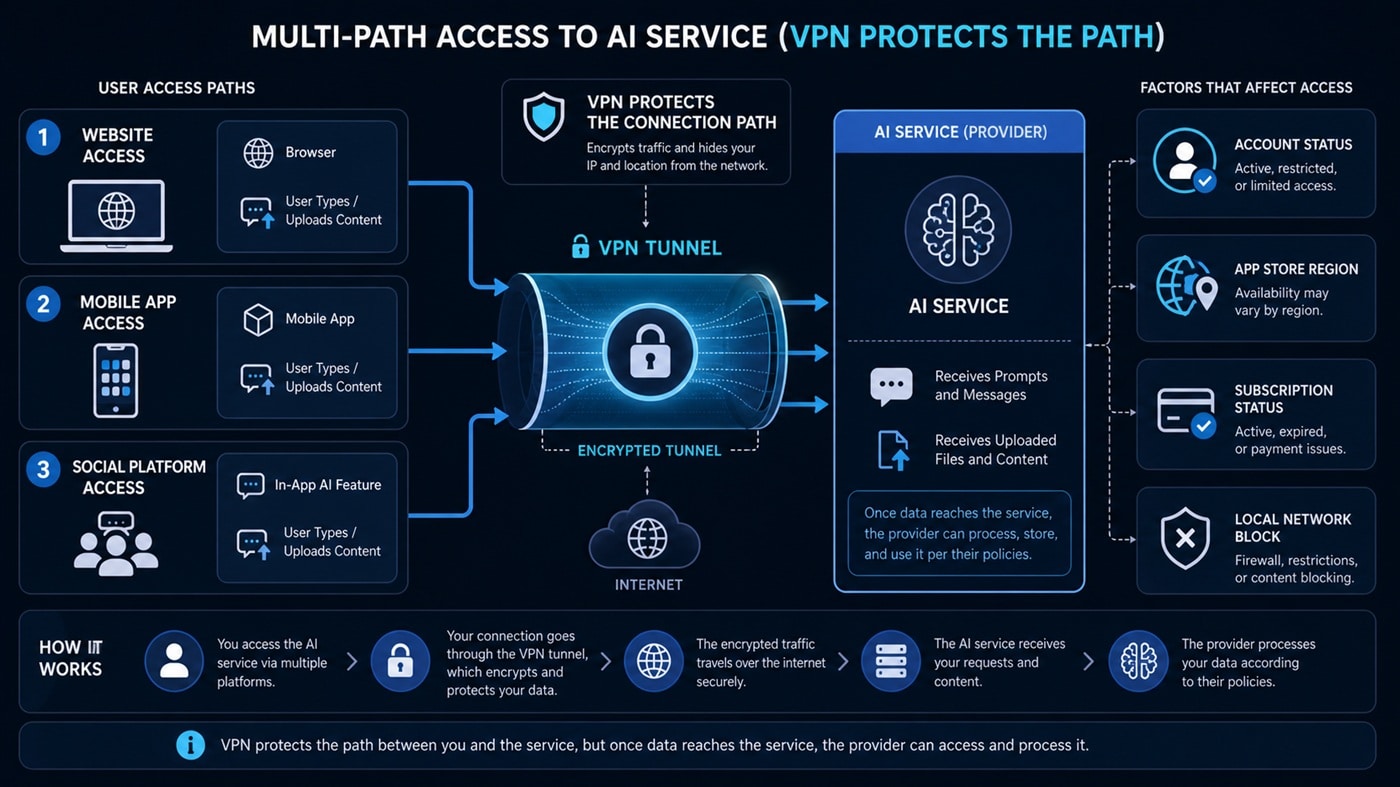
Grok and X AI privacy data flow showing VPN protection and provider data handling
A VPN protects the connection path, but Grok or X still receives the prompts, files, images, and account activity you submit.

Grok and Country Restrictions

Grok availability can change because it depends on xAI, X, app stores, local rules, safety issues, and rollout decisions. Avoid assuming that one old country list is always accurate.

There have also been recent examples of country-level restrictions involving Grok. AP reported that Indonesia allowed Grok to resume operations on a conditional basis and under strict supervision after an earlier ban tied to explicit AI-generated content concerns. Reuters reported that Malaysia lifted a temporary Grok block after X implemented safety measures. Those examples show why Grok access can change quickly by country and by feature.

The safest approach is to check official Grok, X, and app store availability for your account and device before relying on a VPN.

Important: If Grok or X is restricted by law, regulator action, app store policy, or platform rules where you are, a VPN may still leave you outside the official rules. Use a VPN for privacy, travel, and legitimate troubleshooting only. This is not legal advice.

Can a VPN Help If X Is Blocked?

Sometimes. If Grok access depends on X and X is blocked on your network, a VPN may help test whether the block is local. This can happen on school Wi-Fi, workplace Wi-Fi, airport Wi-Fi, public networks, or in places where social platforms are filtered.

However, the same limits apply. A VPN may help with a network block, but it does not change your X account status, app permissions, local laws, subscription, platform rules, app store region, or device restrictions.

If your workplace or school blocks X or Grok, follow its rules. Using a VPN to bypass internal policy can create problems.

How to Test Whether a VPN Helps With Grok

Use a simple troubleshooting process before assuming Grok is unavailable.

  1. Check where the problem happens. Test Grok.com, the Grok app, and Grok through X separately.
  2. Try another network. Test mobile data, home Wi-Fi, hotel Wi-Fi, office Wi-Fi, or another public network.
  3. Update your app. Make sure X and Grok apps are current.
  4. Clear cache and cookies. Old browser data can keep login or region states stuck.
  5. Use a private browser window. This helps separate cookies from the current VPN connection.
  6. Connect to a VPN server before opening Grok or X. Do not open the app first and switch location afterward.
  7. Try a nearby server for privacy. If access already works, a nearby reliable server usually gives better speed.
  8. Try a USA, UK, Europe, Japan, or Singapore server for access testing. Use this when you suspect a region or routing issue.
  9. Check account, app store, and subscription status. If the block is account-based, a VPN may not solve it.

If the network blocks VPN traffic, read our VPN obfuscation guide. If X, Grok, or another AI site is blocked on your network, see How to Access Blocked Websites.

Best VPN Locations for Grok and X AI

The best VPN location depends on what problem you are trying to solve. If Grok already works and you mainly want privacy, choose the nearest stable server. If you are testing access differences, try a server in a major market such as the United States, United Kingdom, Canada, Europe, Japan, or Singapore.

Nearest stable server

Best for public Wi-Fi privacy, speed, low latency, and normal Grok or X use when access already works.

United States

Useful for testing US-region behavior, app access differences, and AI feature rollouts.

United Kingdom or Europe

Useful for users who want English-language access testing and may need lower latency than a faraway US connection.

Japan or Singapore

Useful for Asia-Pacific users who need a closer route for AI tools and X-based workflows.

For a broader breakdown, read our guide to the best VPN locations for AI tools.

What to Look for in a VPN for Grok

If you want a VPN for Grok, X, and other AI tools, choose one that is practical for daily use, not just one that claims to “unblock everything.”

Fast, stable servers

Grok, X, image tools, and AI chats feel better when pages load quickly and sessions stay stable.

DNS leak protection

DNS leaks can create mixed location signals and make region troubleshooting harder.

Mobile and desktop support

Grok users may switch between Grok.com, iOS, Android, X mobile, and desktop browser sessions.

Multiple server locations

If one network route is blocked or slow, another VPN location can help you test the issue.

Public Wi-Fi protection

A VPN is useful when using Grok on hotel, airport, café, coworking, school, or conference Wi-Fi.

Privacy-first positioning

Use a VPN for privacy and troubleshooting, not unrealistic guarantees about every AI tool or platform rule.

Grok vs ChatGPT, Claude, Gemini, DeepSeek, Perplexity, Suno and Midjourney

Each AI tool has a different access model. ChatGPT depends on OpenAI’s supported-country rules. Claude depends on Anthropic’s supported-region rules. Google AI Studio and Gemini API use Google’s available-region rules. DeepSeek has its own terms and privacy concerns. Perplexity may show Cloudflare checks with some VPNs. Suno adds AI music rights, payment, age and terms issues. Midjourney may involve Discord, image uploads, subscriptions and copyright questions. Grok may depend on xAI, Grok.com, the Grok apps, X, app stores, and local restrictions.

That is why a VPN should be treated as one troubleshooting and privacy tool, not a universal unlock button.

For related guides, see VPN for ChatGPT while traveling, VPN for Claude AI, VPN for DeepSeek AI, VPN for Perplexity AI, VPN for Suno AI Music, and VPN for Midjourney and Discord AI Tools.

Final Verdict: Should You Buy a VPN for Grok?

Yes, a VPN can be worth it if you use Grok, X, and other AI tools while traveling, on public Wi-Fi, or on networks that sometimes block AI or social platforms.

A VPN is useful for privacy, network troubleshooting, visible-IP testing, and safer AI sessions on shared networks. But it should not be treated as a guaranteed way to bypass account rules, app store limits, local laws, school rules, workplace rules, or platform restrictions.

If you use multiple AI tools, the best long-term setup is a VPN account that works well for Grok, ChatGPT, Claude, Gemini, DeepSeek, Perplexity, Suno, Midjourney, AI video tools, and developer platforms. Start with our full guide to the best VPN for AI tools.

Need a VPN for Grok and X AI?

Use a VPN account for public Wi-Fi privacy, travel access, network troubleshooting, visible-IP testing, and safer AI sessions across Grok, X, and other AI tools.

Buy a VPN Account

Note: A VPN may help with network blocks and privacy, but it cannot guarantee Grok access or override xAI, X, app store, account, payment, subscription, or local rules.

FAQ: VPN for Grok and X AI

Can a VPN help with Grok?

A VPN may help if the issue is caused by public Wi-Fi, school or workplace filtering, DNS filtering, mobile carrier routing, visible IP location, or travel-related access problems. It will not always help with account, app store, subscription, platform, or local restriction issues.

Is Grok the same on X and Grok.com?

Grok can be accessed through different paths, including Grok.com, the Grok mobile apps, and X. Access, settings, privacy rules, and account requirements may differ depending on how you use it.

Can a VPN fix Grok app store problems?

Not always. A VPN can change your visible IP address, but app availability may also depend on your Apple App Store or Google Play country, device settings, account history, payment region, and rollout timing.

Does a VPN make Grok private?

No. A VPN protects your network connection and can hide your real IP address from websites, but Grok or X still receives the prompts, images, files, messages, and account activity you submit.

What VPN location is best for Grok?

If privacy is your goal and Grok already works, choose the nearest reliable server. If you are testing access issues, try a stable server in the United States, United Kingdom, Europe, Japan, or Singapore.

Can a VPN help if X is blocked on my network?

Sometimes. A VPN may help with network-level X blocks on public Wi-Fi, school, workplace, hotel, or travel networks. It will not override X account rules, app restrictions, local laws, payment rules, subscription access, or platform decisions.

Official Sources Checked

Related Articles

VPN for DeepSeek AI: Privacy, Workplace Blocks, and Network Access

Last updated: May 2026
DeepSeek AI + VPN Guide

VPN for DeepSeek AI: Workplace, School and Network Blocks

DeepSeek became one of the most talked-about AI tools because it offers powerful reasoning, coding and API models at low cost. But it has also raised privacy, workplace security, government-device and network-access questions around the world.

A VPN may help in some cases, especially when DeepSeek is blocked by school Wi-Fi, workplace networks, hotel Wi-Fi, airport Wi-Fi, public hotspots, DNS filtering, ISP filtering or visible IP-location issues. But a VPN cannot override employer rules, school rules, device management, government-device restrictions, account restrictions, local laws or DeepSeek’s own terms.

Quick answer
A VPN may help if DeepSeek is blocked by public Wi-Fi, school/work filtering, DNS filtering, ISP routing or visible IP-location issues.
Not guaranteed
A VPN does not override workplace rules, school rules, government-device bans, DeepSeek terms, privacy risks or local laws.
Best use case
Public Wi-Fi privacy, network troubleshooting, travel access and testing whether a DeepSeek block is network-based.

If you use several AI platforms, start with our main guide to the best VPN for AI tools. If your main concern is privacy, also read our guide to using a VPN for AI privacy. If DeepSeek or another AI tool shows a country or availability error, see AI Tool Not Available in Your Country.

DeepSeek AI privacy and VPN data flow showing prompts still reach provider
A VPN may help test whether a DeepSeek access issue is caused by a network block, public Wi-Fi filter, DNS issue or visible IP location.

Quick Answer: Can a VPN Help With DeepSeek AI?

Yes, a VPN may help with DeepSeek AI when the problem is network-based. For example, if DeepSeek is blocked on a school network, workplace Wi-Fi, hotel Wi-Fi, airport network, café connection, library Wi-Fi or mobile carrier route, a VPN can sometimes route traffic through a different server and test whether the restriction is local.

A VPN is also useful for privacy on public Wi-Fi. It helps protect the connection between your device and the VPN server and can hide your real IP address from websites.

But a VPN is not a complete privacy solution and not a guaranteed unlock. DeepSeek’s privacy policy says it may collect prompts, uploaded files, chat history, IP address, device data, cookies, logs and approximate location based on IP address. It also says personal data may be processed and stored in the People’s Republic of China. A VPN can hide your real network IP from websites, but DeepSeek still receives the prompts, files and account activity you submit to the service.

A VPN can help with DeepSeek network access and public Wi-Fi privacy, but it does not make your prompts invisible to DeepSeek and should not be used to break workplace, school or government-device rules.

What Is DeepSeek AI?

DeepSeek is an AI company known for chat, coding, reasoning and API models. Users may access DeepSeek through its web app, mobile app or developer platform depending on availability, account status and product rules.

DeepSeek is popular with developers, students, AI researchers, traders, writers and technical users because it can be useful for code, reasoning, translation, analysis, brainstorming and low-cost AI experimentation.

At the same time, DeepSeek has become a frequent topic in privacy and security conversations. Some workplaces and government agencies restrict it because of data-handling concerns, security policies or risk scoring inside enterprise security tools.

Why DeepSeek May Be Blocked at Work or School

DeepSeek may be blocked even when the website itself is online. The restriction may come from your employer, school, government agency, mobile carrier, public Wi-Fi provider, DNS filter, firewall, device-management profile or security software.

Reuters reported that Microsoft does not allow employees to use the DeepSeek app because of concerns related to data vulnerability and Chinese propaganda. FedScoop reported that the U.S. Department of Agriculture blocked DeepSeek through Microsoft Defender for Cloud Apps. Other organizations may treat DeepSeek as a higher-risk AI tool depending on their security policies.

Workplace security policies

Companies may block DeepSeek to prevent employees from pasting internal documents, source code, client data or proprietary information into an external AI tool.

School or university filters

Schools may block AI tools because of academic integrity, data privacy, bandwidth, classroom management or student-safety policies.

Government-device restrictions

Some public-sector organizations restrict DeepSeek on official devices because of security, data-handling or compliance concerns.

Public Wi-Fi filtering

Hotels, airports, cafés, libraries and coworking networks may block AI tools, unknown apps or high-risk web categories.

When a VPN Can Help With DeepSeek

A VPN can help when the issue is caused by the network path between your device and DeepSeek. For example, if a hotel Wi-Fi network blocks AI tools or a mobile carrier routes traffic strangely, a VPN may help test another route.

A VPN can also protect your connection when you are using DeepSeek on public Wi-Fi. That matters if you are logging in, sending prompts, uploading files or downloading generated content from shared networks.

A VPN may help with:

  • Hotel, airport, café, library or coworking Wi-Fi blocks
  • School or workplace network filtering
  • DNS filtering or local firewall rules
  • Mobile carrier routing issues
  • Testing whether DeepSeek is affected by visible IP location
  • Public Wi-Fi privacy while using AI tools
  • Access troubleshooting while traveling

A VPN will not help with:

  • Employer or school policy violations
  • Government-device bans or managed-device restrictions
  • DeepSeek account restrictions
  • DeepSeek service outages
  • Local laws or compliance rules
  • Provider privacy and data-retention policies
  • Security software controlled by your organization

DeepSeek Privacy: What a VPN Does and Does Not Protect

A VPN protects the network connection. It can hide your real IP address from websites and reduce exposure on public Wi-Fi. That is useful, but it is only one privacy layer.

DeepSeek’s privacy policy says it may collect account information, prompts, uploaded files, photos, feedback, chat history, IP address, device identifiers, cookies, logs and approximate location based on IP address. It also says personal data may be directly collected, processed and stored in the People’s Republic of China.

That means a VPN can reduce the amount of real network-location information exposed, but it does not stop DeepSeek from receiving whatever you type or upload.

VPN privacy

Protects your connection on public Wi-Fi, masks your real IP address from websites and helps reduce local network snooping.

DeepSeek provider privacy

Depends on DeepSeek’s privacy policy, account settings, prompt handling, storage practices and data-processing rules.

What Not to Put Into DeepSeek

DeepSeek’s own privacy policy says its services are not designed or intended to process sensitive personal data, and it says users should not provide sensitive personal data to the service. That is important advice for all AI tools, not only DeepSeek.

Even with a VPN, avoid entering sensitive or confidential information unless you fully understand the provider, privacy settings, legal implications and your organization’s policy.

Do not paste secrets

Avoid passwords, API keys, crypto seed phrases, SSH keys, private tokens and authentication credentials.

Be careful with work data

Do not upload source code, client data, business plans, legal documents or internal files unless your organization allows it.

Avoid personal records

Health records, legal files, financial records, identity documents and private messages may require stronger privacy controls.

Use approved tools for work

If your employer has an approved AI platform, use that instead of trying to route around security policies with a VPN.

DeepSeek AI privacy and VPN data flow showing prompts still reach provider
A VPN protects the network path, but DeepSeek still receives the prompts, files and account activity you submit.

Can a VPN Bypass a Workplace DeepSeek Block?

Technically, a VPN may route around some network-level blocks. But that does not mean you should use it that way.

If your employer, school, government agency or organization blocks DeepSeek, there may be a security or compliance reason. Using a VPN to bypass that rule could violate internal policy, create account risk or expose sensitive data.

The safer use case is troubleshooting and privacy on networks you are allowed to use. For example, using a VPN on hotel Wi-Fi while working on personal AI research is different from using a VPN to bypass an employer’s security policy on a company laptop.

Important: Do not use a VPN to violate workplace, school, government-device or local rules. Use a VPN for privacy, travel and legitimate access troubleshooting.

How to Test Whether DeepSeek Is Blocked by Your Network

If DeepSeek does not load, test carefully before assuming the service is banned or unavailable.

  1. Try another network. Test mobile data, home internet, hotel Wi-Fi, office Wi-Fi or another connection.
  2. Check whether DeepSeek is down. If the service is having an outage, a VPN will not fix it.
  3. Try another browser or private window. This helps rule out cached login or browser issues.
  4. Clear cache and cookies. Old sessions can keep broken states stuck.
  5. Connect to a VPN server. Open the VPN first, then open DeepSeek.
  6. Try a nearby server for speed. If privacy is the goal, a nearby reliable server is usually best.
  7. Try a US, UK or Europe server for access testing. Use this only to test whether the issue changes by location.
  8. Use obfuscation if VPN traffic is blocked. Some hotel, school, office and restrictive networks block normal VPN protocols.
  9. Respect network rules. If the device or network belongs to your employer or school, follow their policy.

If your VPN connects but DeepSeek still fails, read our blocked websites guide and VPN obfuscation guide.

Best VPN Locations for DeepSeek AI

The best VPN location depends on your goal. If DeepSeek already works and privacy is your main concern, choose the nearest reliable server for better speed. If you are troubleshooting a regional or network issue, test a few stable locations.

Nearest stable server

Best for public Wi-Fi privacy, low latency and general AI use when DeepSeek already works.

United States

Useful for broader AI tool testing and checking whether access behavior changes from a US server.

United Kingdom or Europe

Useful for users who want English-language access testing and may need lower latency than a distant US route.

Japan or Singapore

Potentially useful for Asia-Pacific users who want closer routes for AI tool access and smoother sessions.

For a broader breakdown, read our guide to the best VPN locations for AI tools.

DeepSeek vs ChatGPT, Claude, Gemini and Perplexity: VPN Differences

Each AI tool has different privacy and access rules. ChatGPT uses OpenAI’s supported-country rules. Claude uses Anthropic’s supported-country rules. Google AI Studio and Gemini API use Google’s available-region rules. Perplexity may show extra Cloudflare checks when a VPN is used. DeepSeek has its own terms, privacy policy, developer platform and availability language.

That is why you should not use one AI/VPN rule for every tool. A VPN may help with IP location, public Wi-Fi and network troubleshooting, but the provider’s own policies still matter.

For other AI tools, see our guides to VPNs for ChatGPT while traveling, VPNs for Claude AI, Google AI Studio region errors, and VPN for Perplexity AI.

What to Look for in a VPN for DeepSeek

If you want a VPN for DeepSeek and other AI tools, look for a setup that works for privacy, travel and daily AI sessions.

DNS leak protection

DNS leaks can create mixed location signals and expose more network data than expected.

Stable server connections

AI sessions can be long. A stable VPN matters when you are coding, prompting, researching or uploading files.

Fast speeds

DeepSeek and other AI tools feel better when pages load quickly and conversations respond without connection lag.

Desktop and mobile support

Users often switch between browser, phone, tablet and laptop when using AI tools.

Multiple server locations

If one network path is blocked or slow, another location may help you test the issue.

Privacy-first approach

Choose a VPN account for public Wi-Fi privacy, travel and safer browsing rather than unrealistic access guarantees.

Final Verdict: Should You Buy a VPN for DeepSeek AI?

Yes, a VPN can be worth it if you use DeepSeek or other AI tools on public Wi-Fi, while traveling or on networks that sometimes block AI services.

A VPN is useful for privacy, network troubleshooting, visible-IP testing and safer AI sessions on shared networks. But it should not be treated as a guaranteed way to bypass workplace rules, school rules, government-device restrictions, local laws, account restrictions or provider privacy policies.

If you use multiple AI tools, the best long-term setup is a VPN account that works well for DeepSeek, ChatGPT, Claude, Gemini, Perplexity, AI image tools, AI music tools and developer platforms. Start with our full guide to the best VPN for AI tools.

Need a VPN for DeepSeek and AI Privacy?

Use a VPN account for public Wi-Fi privacy, travel access, AI tool troubleshooting, visible-IP testing and safer AI sessions on shared networks.

Buy a VPN Account

Note: A VPN may help with network blocks and privacy, but it cannot override workplace policies, school rules, local laws, account restrictions or provider rules.

FAQ: VPN for DeepSeek AI

Can a VPN help with DeepSeek AI?

A VPN may help if DeepSeek is blocked by public Wi-Fi, school or workplace filtering, mobile carrier routing, DNS filtering or visible IP-location issues. It will not always help with account, policy, legal or service-side restrictions.

Why is DeepSeek blocked at work?

Some workplaces block DeepSeek because of data security, compliance, privacy and risk-management concerns. Employees should follow their organization’s AI and security policies.

Does a VPN make DeepSeek private?

No. A VPN protects your network connection and can hide your real IP address from websites, but DeepSeek still receives the prompts, files and account activity you submit.

Can I use a VPN to bypass a workplace DeepSeek block?

A VPN may technically route around some network blocks, but using it to bypass workplace, school or government-device restrictions can violate policy. Use a VPN for privacy and legitimate troubleshooting.

What VPN location is best for DeepSeek?

If privacy is your goal and DeepSeek already works, choose the nearest reliable server. If you are testing access issues, try a stable server in the United States, United Kingdom, Europe, Japan or Singapore.

Should I put sensitive data into DeepSeek?

Be careful. DeepSeek’s privacy policy says its services are not designed or intended to process sensitive personal data. Avoid uploading passwords, private keys, medical records, legal files, client data or confidential work material unless you fully understand the risks and rules.

Official Sources Checked

Related Articles

VPN for Suno AI Music: Access, Privacy and Network Blocks

Last updated: May 2026
Suno AI Music + VPN

VPN for Suno AI Music: Access, Privacy, and Network Blocks

Suno has made AI music creation simple for creators, marketers, YouTubers, TikTok users, musicians, and hobbyists. But like many AI tools, Suno can still run into access issues depending on your country, payment setup, app store region, school or workplace network, public Wi-Fi, or travel location.

A VPN may help in some cases, especially when the problem is caused by local network filtering, public Wi-Fi, visible IP location, or travel-related routing. But a VPN cannot guarantee Suno access, fix every payment issue, change your account eligibility, or override Suno’s terms, age rules, rights rules, provider restrictions, or local laws.

Quick answer
A VPN may help with Suno when the issue is public Wi-Fi, school/work network filtering, travel routing, DNS filtering, or visible IP location.
Not guaranteed
Suno access may also depend on account status, payment region, app store availability, age rules, rights rules, provider terms, and local laws.
Best use case
AI music creation on hotel Wi-Fi, airport Wi-Fi, coworking spaces, school networks, public hotspots, and while traveling.

If you use several AI platforms, start with our main guide to the best VPN for AI tools. If your issue is broader tool availability, read our guide on what to do when an AI tool is not available in your country. If privacy is the main concern, see VPN for AI privacy.

AI music creation workflow protected by a VPN connection
A VPN can help protect AI music sessions when creating, uploading, and generating songs on public or shared networks.

Quick Answer: Should You Use a VPN for Suno?

A VPN can be useful for Suno users who create music while traveling, working from public Wi-Fi, using school or office networks, or troubleshooting region-related access issues.

A VPN changes the public IP address that websites and apps see. It also helps protect your connection from local network snooping on shared Wi-Fi. That can be useful when you are logging into Suno, entering prompts, uploading audio, downloading generated songs, or working from a hotel, airport, café, library, or coworking space.

However, a VPN is not a magic unlock button. If the issue is your Suno account, subscription, payment method, app store region, age eligibility, local law, rights question, or provider rule, a VPN may not help. Suno’s terms also include restrictions around circumventing geographic restrictions or IP-based blocks, so use a VPN for privacy and legitimate troubleshooting, not to ignore Suno’s rules.

A VPN is most useful for Suno when the problem is network-based: public Wi-Fi, workplace filters, school blocks, travel routing, DNS filtering, or IP-location testing. It is not a guaranteed fix for account, payment, rights, age, or legal restrictions.

What Is Suno?

Suno is an AI music generation platform. Users can create songs, beats, vocals, lyrics, and music ideas from prompts. It is popular with creators who want quick demos, background music ideas, social media music, parody concepts, songwriting inspiration, and experimental audio.

Because Suno involves creative output, accounts, uploads, downloads, and sometimes paid plans, the access problem can be more complicated than simply asking whether the website loads.

A Suno issue may involve your network, your country, your payment method, your device, your app store region, your age eligibility, your account status, or the current rules for the feature you are trying to use.

Why Suno May Not Work on Some Networks

Many Suno access issues come from local networks rather than the AI tool itself. Schools, offices, public libraries, hotels, airports, cafés, conference Wi-Fi, and coworking networks may block AI tools, music services, streaming media, uploads, downloads, or account login pages.

That can make Suno look broken even when your account is fine.

School or workplace filtering

Some schools and employers block AI tools, music sites, media generation tools, or entertainment platforms on their networks.

Public Wi-Fi limits

Hotels, airports, cafés, and coworking spaces may limit uploads, downloads, audio tools, or high-traffic web apps.

Travel routing

When you travel, your connection may be routed through a country, provider, or network that triggers different behavior.

Payment or app region

Even if the site loads, paid features or mobile app access may depend on payment method, app store region, billing setup, or account history.

When a VPN Can Help With Suno AI Music

A VPN is most useful when the issue is related to your connection, visible location, DNS filtering, or local network. It can route your traffic through another server, which may help you test whether a problem is network-based.

A VPN may help with:

  • Public Wi-Fi privacy while using Suno
  • Hotel, airport, café, library, or coworking Wi-Fi blocks
  • School or workplace network filtering
  • DNS filtering or ISP-level blocks
  • Travel-related access problems
  • Testing whether a Suno error is IP-location based
  • Protecting uploads and downloads on shared networks

A VPN will not always help with:

  • Suno account restrictions
  • Payment or billing-region problems
  • Age eligibility rules
  • App Store or Google Play country limits
  • Copyright, rights, ownership, or commercial-use questions
  • Local law, export-control, or provider-term restrictions
  • Suno IP blocks or geographic restrictions that Suno says not to circumvent

Suno, Payments, and Region Issues

Payment issues are different from VPN issues. A VPN may change your visible IP location, but it does not automatically change your payment method, billing country, card eligibility, app store region, or account history.

Suno’s help documentation lists supported currencies and payment methods, and it notes that some payment methods are available only in some regions. That means a VPN may not fix a payment problem if the issue is tied to your card, wallet, billing region, app store, or payment provider.

If the website loads but checkout fails, the problem may be billing-related rather than access-related.

Important: Do not assume every Suno issue is a VPN issue. If access works but payment fails, check Suno’s billing help, your card, your payment method, your app store settings, and your account region.

Suno, Age Rules, Local Laws, and Terms

Suno’s minimum-age help page says users need to be at least 13 years old, and that in some countries the age of consent for data processing can vary. Suno’s Terms also include an international use and export controls section saying users are responsible for complying with the laws of their jurisdiction.

Suno’s Terms also warn against trying to circumvent geographic restrictions or IP-based blocks, including through virtual private networks. That matters because a VPN does not change your legal responsibilities, your account eligibility, or the platform’s rules.

The safest approach is to use Suno from places where you are allowed to use it, follow the platform’s rules, and use a VPN for privacy, public Wi-Fi protection, travel security, and legitimate troubleshooting.

Public Wi-Fi Privacy for AI Music Creators

AI music workflows can involve more sensitive activity than people expect. You may be logging into an account, writing lyrics, uploading audio, downloading generated songs, working on client ideas, or testing commercial concepts.

If you are doing that on hotel, airport, café, library, or coworking Wi-Fi, a VPN helps protect the connection between your device and the VPN server. This reduces what the local network can see.

A VPN does not hide your prompts, uploaded audio, generated music, voice recordings, or account activity from Suno itself. Suno still receives the content you submit to its service according to its own privacy policy and terms.

AI music public Wi-Fi privacy with VPN protected audio workflow
A VPN protects the network connection, but the AI music provider still receives the prompts, audio, and files you submit.

Suno Rights, Ownership, and VPNs

A VPN does not change the rights or ownership rules for songs you create. Suno’s rights and ownership help pages distinguish between free-plan and paid-subscription usage. If your concern is monetizing music, publishing songs, or using AI music in client work, the important question is your Suno plan and Suno’s current rights rules — not your VPN location.

Use a VPN for privacy and network access. Use Suno’s official rights documentation for commercial-use decisions.

How to Test If a VPN Helps With Suno

If Suno does not load or behaves strangely, test the issue step by step.

  1. Try another network. Test mobile data, home internet, hotel Wi-Fi, or another Wi-Fi network.
  2. Check whether Suno itself is working. If the service is having an outage, a VPN will not fix it.
  3. Clear cache and cookies. Old browser data can sometimes keep login or region problems stuck.
  4. Use a private browser window. This helps separate account cookies from connection testing.
  5. Connect to a VPN server. Choose a stable server before opening Suno.
  6. Try a nearby server first for speed. If privacy is your goal, nearby usually feels smoother.
  7. Try a USA, UK, Europe, Japan, or Singapore server for access testing. Use this only when you suspect a location-based issue.
  8. If payment fails, check billing separately. A VPN may not solve card, currency, billing-region, app-store, or payment-method problems.
  9. If Suno itself blocks access, do not keep trying to bypass it. Suno’s terms include restrictions on circumventing geographic restrictions and IP-based blocks.

Best VPN Locations for Suno AI

The best VPN location depends on your goal. If Suno already works and you only want privacy, choose the nearest reliable server. If you are troubleshooting a region issue, choose a server in a country where your account, payment method, and local rules support your use case.

Nearest stable server

Best for speed, privacy, uploads, downloads, and general AI music work when Suno already works.

United States

Useful for US-region testing, public Wi-Fi routing, and AI tool availability checks.

United Kingdom or Europe

Useful for users who want English-language access testing but may need lower latency than a distant US route.

Japan or Singapore

Potentially useful for Asia-Pacific users who want closer routes for AI music generation and downloads.

For a broader breakdown, read our guide to the best VPN locations for AI tools.

What to Look for in a VPN for Suno and AI Music

AI music tools are different from text-only AI chat. You may be uploading files, previewing audio, downloading tracks, and keeping long creative sessions open. That makes stability important.

Fast downloads and uploads

AI music tools involve audio files. Slow VPN servers can make previews, exports, and downloads frustrating.

Stable sessions

You do not want the VPN dropping while generating music, uploading references, or working on a paid account.

DNS leak protection

DNS leaks can create mixed location signals and make region troubleshooting harder.

Desktop and mobile support

Creators often switch between browser, phone, tablet, and desktop workflows.

Multiple server locations

If one route is slow or blocked, switching to another location can help test the issue.

Privacy-first setup

Choose a VPN account that is practical for public Wi-Fi, travel, and regular AI tool use.

Does This Apply to Other AI Music Tools?

Yes. The same logic applies to other AI music, AI voice, AI audio, and creative AI tools. A VPN may help with public Wi-Fi privacy, network filtering, travel routing, DNS filtering, and IP-location testing.

But it will not always fix account eligibility, payment region, app store availability, subscription status, invite-only access, commercial-use rules, or provider policy.

If you also use AI image tools, see our guide to VPNs for Midjourney and Discord AI tools. If you use AI video tools, see our guide to using a VPN for Sora and AI video tools.

Suno vs Perplexity, DeepSeek, ChatGPT, Claude, and Gemini

Each AI tool has different risks. Perplexity is search-heavy and may trigger Cloudflare checks with VPNs. DeepSeek has workplace and privacy concerns. ChatGPT and Claude have supported-country rules. Google AI Studio and Gemini API have developer-region rules. Suno adds music-specific concerns around uploads, downloads, rights, ownership, payment methods, and age rules.

That is why one VPN rule does not fit every AI tool. A VPN may help with the network layer, but provider rules still matter.

Related guides: VPN for Perplexity AI, VPN for DeepSeek AI, VPN for ChatGPT While Traveling, VPN for Claude AI, and Google AI Studio Region Error.

Final Verdict: Should You Buy a VPN for Suno?

Yes, a VPN can be worth it if you use Suno or other AI music tools on public Wi-Fi, while traveling, or on networks that sometimes block creative AI services.

A VPN is especially useful for privacy, network troubleshooting, IP-location testing, and safer creative sessions on shared networks. But it should not be treated as a guaranteed solution for payment issues, account eligibility, local laws, age rules, app store restrictions, rights questions, or platform policies.

If you use multiple AI tools, the best long-term setup is a VPN account that works well for AI music, AI images, AI video, chat tools, research tools, and developer tools. Start with our main guide to the best VPN for AI tools.

Need a VPN for Suno and AI Music Tools?

Use a VPN account for public Wi-Fi privacy, AI music access testing, travel routing, uploads, downloads, and safer creative sessions.

Buy a VPN Account

Note: A VPN may help with network blocks and privacy, but it cannot guarantee Suno access or override payment, account, legal, rights, age, or provider rules.

FAQ: VPN for Suno AI Music

Can a VPN help with Suno AI?

A VPN may help if the issue is caused by public Wi-Fi, school or workplace filtering, DNS filtering, visible IP location, or travel routing. It will not always help with account, payment, age, app store, rights, or provider-rule issues.

Why is Suno not working on my Wi-Fi?

Suno may fail on some networks because schools, workplaces, hotels, cafés, libraries, or public Wi-Fi providers can block AI tools, music platforms, uploads, downloads, or media services.

Can a VPN fix Suno payment problems?

Not always. A VPN can change your visible IP address, but payment problems may depend on your card, billing country, payment method, currency, app store region, payment processor, or account settings.

What VPN location is best for Suno?

If Suno already works and privacy is your goal, use the nearest reliable server. If you are testing access issues, try a stable server in a country where your use of Suno is supported and allowed.

Does a VPN protect my Suno prompts and songs?

A VPN protects your network connection and can hide your real IP address from websites, but Suno still receives the prompts, audio, files, songs, voice recordings, and account activity you submit to its service.

Is a VPN useful for AI music creators?

Yes. A VPN is useful for public Wi-Fi privacy, travel, network troubleshooting, and safer creative sessions while using Suno or other AI music tools.

Official Sources Checked

Related Articles

VPN for AI Privacy: Protect Your Prompts on Public Wi-Fi

Last updated: May 2026
AI Privacy + VPN Guide

VPN for AI Privacy: Protect Your Prompts on Public Wi-Fi

AI tools are now part of everyday work. People use ChatGPT, Claude, Gemini, Google AI Studio, AI video tools, AI coding assistants, image generators, and research tools from laptops, phones, hotels, airports, cafés, schools, and coworking spaces.

A VPN can help protect your connection while using AI tools, especially on public Wi-Fi. It can encrypt your traffic between your device and the VPN server, hide your real IP address from websites, and reduce exposure on shared networks. But a VPN does not make your prompts invisible to the AI provider itself.

Quick answer
A VPN helps protect your connection while using AI tools, especially on hotel, airport, café, and coworking Wi-Fi.
Important limit
A VPN does not hide your prompts, uploads, files, images, code, or account activity from the AI provider you are using.
Best use case
Public Wi-Fi privacy, travel, safer logins, IP masking, and AI tool access troubleshooting.

This guide focuses on privacy. If you want the full buyer guide, start with our best VPN for AI tools page. If your issue is access while abroad, read our guide to using a VPN for ChatGPT while traveling. If you are choosing a server location, see Best VPN Location for AI Tools.

AI privacy data flow showing what a VPN protects and what the AI provider still sees
A VPN helps protect your connection when using AI tools on public Wi-Fi networks.

What Does “AI Privacy” Mean?

AI privacy means controlling what information you expose when using AI tools. That includes your prompts, uploaded files, account details, IP address, device information, location signals, browsing activity, and the network you connect from.

Many users focus only on the prompt itself. That matters, but it is not the whole picture. Your AI session also includes network metadata, account login data, cookies, files, browser activity, device signals, and sometimes location information.

A VPN helps with one important layer: the network connection. It does not replace good account settings, careful prompt habits, secure passwords, or the privacy controls inside ChatGPT, Claude, Gemini, or other AI tools.

A VPN protects the path your traffic takes across the internet, but the AI provider can still process the prompts and files you submit to its service.

What a VPN Protects When You Use AI Tools

A VPN routes your internet connection through a VPN server before it reaches the websites and apps you use. This can help protect your activity from local network snooping, reduce exposure on public Wi-Fi, and make websites see the VPN server IP address instead of your real IP address.

Public Wi-Fi traffic

A VPN helps protect your connection on hotel, airport, café, school, library, and coworking Wi-Fi networks.

Your real IP address

Websites and apps generally see the VPN server IP address instead of your normal home, office, hotel, or mobile network IP.

Network-level snooping

A VPN makes it harder for a local network operator or nearby attacker to monitor your browsing activity on shared Wi-Fi.

Travel privacy

A VPN helps protect your AI sessions when you are moving between hotels, airports, mobile networks, and public hotspots.

Location testing

A VPN can help test whether an AI tool behaves differently when your visible IP location changes.

Safer logins

When you log in to AI accounts on public Wi-Fi, a VPN adds another privacy layer to the connection.

What a VPN Does Not Protect

This is where many VPN articles become misleading. A VPN is useful, but it does not make AI use private from every party.

When you type a prompt into ChatGPT, Claude, Gemini, Perplexity, an AI video tool, or another AI service, that provider still receives the prompt. If you upload a file, the provider receives the file. If you are logged in, the provider can usually associate activity with your account, depending on its settings and policies.

A VPN does not hide prompts from the AI provider

The AI service still receives the text, images, files, code, or audio you submit.

A VPN does not change provider data policies

You still need to check each AI platform’s privacy settings, data controls, retention rules, and account options.

A VPN does not make unsafe prompts safe

Do not paste passwords, private keys, medical records, client secrets, or confidential documents into AI tools unless you know the provider and plan are appropriate.

A VPN does not replace account security

Use strong passwords, two-factor authentication where available, and careful account management.

ChatGPT Privacy and VPN Use

OpenAI gives users data controls that can affect whether conversations help improve models. OpenAI’s public privacy materials also explain that location can be inferred from information such as IP address.

That makes a VPN useful for one part of the privacy picture: IP and network privacy. A VPN can reduce how much your real network location is exposed during a session. But it does not stop OpenAI from receiving the prompts, files, images, or messages you submit while using ChatGPT.

If you use ChatGPT for sensitive work, check your account privacy settings, data controls, memory settings, temporary chat options, and your organization’s AI policy before uploading private information.

Claude, Gemini, and Other AI Tools

The same privacy pattern applies to Claude, Gemini, Google AI Studio, Perplexity, AI video tools, AI music tools, image generators, and coding assistants.

A VPN protects your network connection. It does not replace the provider’s privacy policy. Google’s Gemini privacy documentation discusses Gemini Apps data handling and connected services. Anthropic’s Claude support documentation explains that users should think carefully before entering sensitive data into Claude Free or Claude Pro. Each provider has its own controls and rules.

This is why privacy-focused AI users should combine a VPN with platform-specific privacy settings.

AI privacy protection with VPN on public Wi-Fi
A VPN protects the network path, but the AI provider still receives the prompts and files you submit.

When a VPN Is Most Useful for AI Privacy

A VPN is especially useful when you are using AI tools outside your normal trusted network.

  • Using ChatGPT or Claude on hotel Wi-Fi
  • Logging in to Gemini or Google AI Studio at an airport
  • Using AI coding tools from a coworking space
  • Uploading files to AI tools from public Wi-Fi
  • Working remotely while traveling
  • Using AI tools on mobile carrier networks with aggressive filtering
  • Testing AI access from different server locations

For travelers, freelancers, remote workers, students, creators, and developers, a VPN is a practical privacy layer. It helps reduce local network exposure while keeping your connection more controlled.

AI Prompts You Should Avoid Sharing

Even with a VPN, some information should be handled carefully. A VPN protects the connection, not the meaning of the content you submit.

Passwords and private keys

Do not paste passwords, API keys, crypto wallet seed phrases, private SSH keys, or authentication tokens into AI tools.

Client-confidential data

Do not upload private client files unless your AI plan, contract, and privacy settings are appropriate for that use.

Medical or legal records

Be careful with health, legal, financial, and identity documents. These may need higher privacy controls than a consumer AI chat account.

Workplace secrets

Source code, internal strategy, customer data, and unreleased business plans may be subject to employer rules or contracts.

Simple AI Privacy Checklist

Use this quick checklist before working with AI tools on sensitive tasks.

  1. Connect your VPN first. Do this before opening the AI tool, especially on public Wi-Fi.
  2. Use HTTPS websites and official apps. Avoid fake AI tool clones and suspicious login pages.
  3. Check the AI provider’s data controls. Review chat history, training, memory, deletion, and sharing settings.
  4. Do not paste secrets. Remove passwords, keys, personal IDs, and private business data before prompting.
  5. Use a fresh browser session for sensitive work. This can reduce cookie and account confusion.
  6. Separate personal and work accounts. Do not mix client, employer, and personal AI use in the same account when privacy matters.
  7. Use a trusted VPN account. Avoid unknown free VPNs when working with AI accounts and private prompts.
Important: A VPN is one layer of privacy. It should be combined with careful prompt habits, strong account security, and the privacy settings inside each AI tool.

Why Public Wi-Fi Is Risky for AI Users

Public Wi-Fi is convenient, but it is not always trustworthy. Hotel, airport, café, and coworking networks can be misconfigured, monitored, filtered, or shared by many unknown users.

When you use AI tools on these networks, you may be logging into accounts, uploading files, sending prompts, or accessing work-related material. A VPN helps create a private tunnel between your device and the VPN server, reducing what the local network can see.

This is one of the strongest reasons to use a VPN even if every AI tool already works in your country.

What to Look for in a VPN for AI Privacy

If privacy is your main reason for buying a VPN for AI tools, look for reliability and practical protection instead of only speed claims.

DNS leak protection

DNS leaks can reveal browsing destinations outside the VPN tunnel. Good VPN software helps keep requests protected.

Kill switch support

A kill switch helps stop traffic if the VPN disconnects, reducing the chance that your real IP suddenly appears.

Fast, stable servers

AI tools can involve long chats, uploads, video, images, code, and research. Stability matters as much as speed.

Desktop and mobile apps

AI users switch between laptops and phones. Your VPN should work across the devices where you use AI tools.

No-log positioning

Choose a VPN service that clearly explains its privacy stance and does not make vague or unrealistic promises.

Useful server locations

Server choice matters for privacy, travel, access testing, and performance. USA, UK, Canada, Europe, and Japan can all be useful depending on the AI tool.

VPN Privacy vs AI Provider Privacy

It helps to separate two different privacy layers.

VPN privacy

This protects your network connection, masks your real IP address from websites, and reduces exposure on public Wi-Fi.

AI provider privacy

This depends on the AI company’s privacy policy, your account settings, training controls, data retention rules, and plan type.

You need both layers. A VPN helps with connection privacy. Provider settings help with what happens after your prompt reaches the AI service.

Is a VPN Worth It for AI Privacy?

Yes, especially if you use AI tools while traveling, working remotely, connecting to public Wi-Fi, uploading files, or logging into AI accounts from shared networks.

A VPN will not make AI use completely private. It will not hide prompts from the AI provider. But it does reduce network exposure and gives you more control over the connection used for ChatGPT, Claude, Gemini, Google AI Studio, AI video tools, and other AI services.

If you use several AI tools, a VPN account is a useful part of your setup. For the broader access and tool comparison, see our main guide to the best VPN for AI tools.

Need a VPN for AI Privacy?

Use a VPN account to protect your connection while using ChatGPT, Claude, Gemini, Google AI Studio, and other AI tools on public Wi-Fi or while traveling.

Buy a VPN Account

Note: A VPN helps protect your connection, but it does not hide prompts or uploads from the AI provider you choose to use.

FAQ: VPN for AI Privacy

Does a VPN protect my AI prompts?

A VPN protects your network connection and can hide your real IP address from websites, but it does not hide your prompts from the AI provider. The AI service still receives the text, files, images, or code you submit.

Is a VPN useful for ChatGPT privacy?

Yes. A VPN is useful for public Wi-Fi privacy, IP masking, travel, and safer logins. You should still review ChatGPT data controls, memory settings, and privacy options.

Can a VPN stop AI companies from storing my chats?

No. A VPN cannot control how an AI provider stores, reviews, or uses your chats. You need to check the privacy settings and data policy of each AI platform.

Should I use a VPN with Claude or Gemini?

A VPN can help protect your connection when using Claude, Gemini, Google AI Studio, and other AI tools, especially on public Wi-Fi or while traveling. It does not replace each provider’s privacy controls.

What should I avoid putting into AI tools?

Avoid passwords, API keys, private crypto keys, medical records, legal files, confidential client data, internal company secrets, and other sensitive information unless your AI plan and privacy controls are appropriate.

Is a free VPN safe for AI privacy?

Free VPNs may be slower, crowded, and less transparent about privacy. For AI accounts, travel, and public Wi-Fi use, a paid VPN account is usually a safer and more reliable choice.

Official Sources Checked

Related Articles

AI Tool Not Available in Your Country? Can a VPN Help?

AI Access + VPN Guide

Last updated: May 2026

AI Tool Not Available in Your Country? Can a VPN Help?

AI tools do not always work everywhere. You may open ChatGPT, Claude, Gemini, Google AI Studio, an AI video tool, an AI music app, an image generator, or an AI coding tool and see a message saying the service is not available in your country.

A VPN may help in some cases, especially when the problem is caused by visible IP location, public Wi-Fi filtering, workplace network blocks, school network blocks, hotel Wi-Fi, or travel-related region errors. But a VPN cannot guarantee access to every AI tool, change your account country, fix billing issues, change your app store country, or override provider rules.

Important: Use a VPN for privacy, safer public Wi-Fi, travel access, and legitimate troubleshooting. Do not treat it as a way to bypass AI provider rules, payment requirements, identity checks, workplace restrictions, school rules, or local laws. This page is general information, not legal advice.
Quick Answer

Can a VPN Help If an AI Tool Is Not Available in Your Country?

Yes, a VPN may help if the AI tool is blocked because of your visible IP location, a public Wi-Fi filter, a school or workplace network block, DNS filtering, or travel-related routing.

No, a VPN will not always work. AI providers may also check your account country, billing region, phone verification, app store country, subscription level, invite status, workspace policy, device signals, cookies, or official supported-country rules.

The safest approach is to check the provider’s official availability page first, then use a VPN for privacy, public Wi-Fi safety, travel access, and legitimate region testing.

Best use case

Testing whether an AI access error is caused by visible IP location or the network you are using.

Not guaranteed

Unsupported-country rules, billing requirements, phone checks, app store country, and invite-only access can still block you.

Best next step

Start with the main Best VPN for AI Tools guide, then choose the right support article below.

Why It Happens

Why AI Tools Say “Not Available in Your Country”

AI services restrict access for many reasons. Some restrictions come from provider policy. Others come from local law, export controls, sanctions, safety reviews, staged product rollouts, app store availability, payment support, age rules, or network blocks.

For users, the result feels the same: the app does not load, the model is missing, the mobile app is unavailable, the API returns an error, or the website says the tool is not available in your country.

Do not assume the only problem is your IP address. The restriction may also be tied to your account, billing region, phone verification, app store country, subscription, device, workspace, browser cookies, or provider policy.

IP location

The AI website or app may check the country of your public IP address before showing a feature or allowing sign-in.

Account country

Your AI account may have a country or region attached to it from signup, billing, phone verification, workspace setup, or previous usage.

Billing region

Some paid plans, API tools, or subscriptions may require a payment method or billing address from a supported country.

App store region

Mobile apps may be available in some Apple App Store or Google Play regions but not others, even when the web app works.

Staged rollout

New AI models and features often launch in selected countries, languages, plans, platforms, or user groups before expanding.

Local network blocks

Schools, workplaces, hotels, airports, mobile carriers, public libraries, or government networks may block AI tools independently.

Common Tools

Which AI Tools Can Have Region or Availability Issues?

Availability changes often, so always check the official provider page. These are common examples where region, account, rollout, app, billing, or network rules can matter.

ChatGPT

ChatGPT is available only in OpenAI’s supported countries and territories. OpenAI also warns that unsupported access can lead to account blocking or suspension.

VPN for ChatGPT while traveling

Claude AI

Claude.ai and Anthropic’s commercial API have supported-country rules. Access can depend on country, account status, API access, billing, and workspace setup.

VPN for Claude AI

Google AI Studio and Gemini API

Google AI Studio and the Gemini API are available only in listed regions. Developer errors may also involve account eligibility, billing, cloud region, or project setup.

Google AI Studio region error guide

Sora and AI video tools

Sora web and app access has been discontinued, but other AI video tools may still have region, account, app, invite, or provider-policy restrictions.

Sora and AI video VPN guide

AI music and image tools

Some creative AI tools vary by country because of licensing, copyright rules, payment support, app store rules, or staged rollouts.

Best VPN location for AI tools

Workplace AI blocks

Some AI tools are not blocked by country but are blocked by an employer, school, or public network. A VPN may help with local network filtering, depending on the rules you are subject to.

How to access blocked websites

Reality Check

What a VPN Can Help With — and What It Cannot Fix

A VPN changes the public IP address websites and apps see. That can be useful for region testing and network blocks, but it does not rewrite your account, payment, phone, or app store history.

A VPN may help with

  • IP-based AI region checks.
  • Public Wi-Fi, hotel, airport, or café network blocks.
  • School, university, or workplace filters, where allowed.
  • Travel-related location errors.
  • Testing whether a feature is country-gated.
  • Privacy while using AI tools on shared networks.

A VPN will not always help with

  • Unsupported-country account rules.
  • Payment or billing-country restrictions.
  • Phone verification problems.
  • Apple App Store or Google Play country limits.
  • Invite-only, waitlisted, or subscription-only features.
  • Provider-side VPN detection, rate limits, or policy enforcement.

Troubleshooting

How to Check Why an AI Tool Is Not Available

Before buying or changing anything, run through this checklist. It helps you understand whether a VPN is likely to help.

  1. Check the official availability page. Look for the provider’s supported countries, available regions, or app availability page.
  2. Check whether the problem is web, app, or API only. Some tools work in the browser but not in the mobile app, or work in the app but not through the API.
  3. Clear cache and cookies. Old location data can keep showing the same region error.
  4. Try a private browser window. This removes some cached account and location signals.
  5. Test a VPN server in a supported country. Open the VPN first, then open the AI tool.
  6. Try another supported server. Some VPN IPs may be overloaded, blocked, or misclassified.
  7. Check account and billing settings. If the tool still fails, the restriction may not be IP-based.
  8. Stop if the provider clearly says your region is unsupported. Do not risk your account by pushing against provider rules.
Server Choice

Best VPN Locations for AI Tools

The best VPN location depends on the AI tool and the official availability list. The safest rule is simple: choose a VPN server in a country where the AI provider officially supports the service you want to use.

United States

Often useful for US-first AI feature rollouts, AI testing, developer tools, and early product launches.

United Kingdom

A practical English-speaking location for travel access, testing, and stable routing in Europe.

Canada

Useful when a tool supports North America and you want an alternative to a USA server.

Netherlands or Germany

Useful for EU-based testing, European routing, and AI tools available across parts of Europe.

Japan or Singapore

Useful for Asia-region routing, travel access, and testing access from major regional internet hubs.

Nearest supported country

Often the best choice for speed, stability, and fewer latency problems while using AI apps.

For a deeper breakdown, read Best VPN Location for AI Tools.
Public networks

Public Wi-Fi, Schools, Offices and AI Blocks

Sometimes “not available” has nothing to do with your country. The AI tool may be blocked by the network you are using.

This can happen on hotel Wi-Fi, airport Wi-Fi, school networks, workplace networks, coworking spaces, public libraries, or mobile carrier networks. A VPN may help because it encrypts your connection and can reduce local network filtering, but you should respect workplace, school, and local rules where they apply.

  • Hotel Wi-Fi
  • Airport Wi-Fi
  • School or university networks
  • Workplace networks
  • Coworking spaces
  • Public libraries
  • Mobile carrier networks

For broader help, read How to Access Blocked Websites.

MENA / Gulf angle

Middle East and Gulf AI Access Issues

Many AI users in the Middle East are expats, remote workers, founders, students, developers, and creators who rely on US and European AI tools.

In places like the UAE, Saudi Arabia, Qatar, Kuwait, Bahrain, and Oman, some AI tools may work normally while others may vary by app, account, workplace, school, billing setup, provider policy, or network. If an AI tool works for other users in your country but not for you, the issue may be local network filtering, employer rules, browser session data, app store region, account status, or payment setup rather than a national restriction.

A VPN can help test whether the issue is network-based and can add privacy when using AI tools on hotel, airport, café, or coworking Wi-Fi. It should not be used to ignore local law, workplace policy, school rules, or provider terms. For legal caution, read Are VPNs Legal?.
VPN features

What to Look for in a VPN for Geo-Restricted AI Tools

If you are buying a VPN mainly for AI tools, choose one that is practical for everyday AI work, not just one that advertises many locations.

  • Supported-country servers for the AI tools you actually use.
  • Fast speeds for AI video, image, voice, coding, and file upload workflows.
  • DNS leak protection to reduce mixed location signals.
  • Desktop and mobile support for browser tools and mobile apps.
  • Stable sessions for long chats, uploads, API testing, and generation workflows.
  • Privacy on public Wi-Fi even when the AI tool already works.
Related AI VPN Guides

Continue With These AI Access Guides

These pages support the broader AI/VPN cluster and help users troubleshoot specific tools, travel situations, region errors, and VPN location choices.

Sora 2 and AI Video Tools

What changed with Sora, what a VPN can still help with, and what it cannot fix after product shutdowns.

Read guide

Best VPN Location for AI Tools

USA, UK, Canada, Netherlands, Germany, Singapore, nearby servers, and supported-country testing.

Read guide

VPN for ChatGPT While Traveling

How to use AI tools more safely on hotel, airport, café, school, and foreign networks.

Read guide

Google AI Studio Region Error

Gemini API, Google AI Studio, browser location, billing, account, and cloud-region checks.

Read guide

VPN for Claude AI

Claude access, supported countries, travel, privacy, and Anthropic account rules.

Read guide

VPN for Travelling

Useful for travelers who use AI tools, banking, email, and work apps on unfamiliar networks.

Read guide

Responsible use

Responsible VPN Use With AI Tools

A VPN is a privacy and connectivity tool. It can help protect your internet traffic, test IP-based access issues, and make public Wi-Fi safer. It should not be treated as a guaranteed way to override every provider’s country rules.

If an AI company says a country is unsupported, using a VPN may still violate that provider’s rules. The safer approach is to check the official availability page, use a VPN for legitimate privacy and troubleshooting, and avoid risky account workarounds.

For country-specific caution, read Are VPNs Legal?. This page is general information only and is not legal advice.

Official Sources

Official Sources Checked

Because AI access rules change often, check official provider pages before relying on any VPN setup for travel, development, paid tools, or business workflows.

FAQ

FAQ: AI Tool Not Available in Your Country

Can a VPN help if an AI tool is not available in my country?

A VPN may help if the issue is caused by visible IP location or local network filtering. It will not always help if the provider does not support your country or if access depends on your account, billing, app store region, phone verification, invite status, or provider rules.

Why are some AI tools geo-restricted?

AI tools may be restricted because of provider policy, regulations, sanctions, safety reviews, staged rollouts, licensing, payment support, app store availability, export controls, or local network rules.

Which AI tools can have country or region restrictions?

ChatGPT, Claude, Google AI Studio, Gemini API, AI video tools, AI music apps, AI image tools, AI coding tools, and workplace AI platforms may all have region, account, app, billing, or network-based restrictions.

What VPN location should I use for AI tools?

Use a VPN server in a country where the AI tool is officially supported. Many users test with a United States server first because new AI features often launch there early, but the nearest supported country may be faster.

Will a VPN fix AI app store restrictions?

Not always. A VPN can change your visible IP location, but app availability may also depend on your Apple App Store or Google Play country, device settings, account history, and payment method.

Is a VPN useful even if AI tools already work?

Yes. A VPN is still useful for public Wi-Fi privacy, travel, safer browsing, and protecting your connection while using AI tools on shared networks.

Is using a VPN for AI tools legal?

VPNs are legal in many countries, but rules vary by location and by how the VPN is used. You should check local laws, workplace or school rules, and the AI provider’s terms before relying on a VPN for access. This is general information, not legal advice.

Need a VPN for AI Access Issues?

Use a VPN account for public Wi-Fi privacy, travel access, network troubleshooting, and supported-region AI testing.

Reminder: A VPN may help with IP-based access issues, public Wi-Fi privacy, travel, and network filtering, but it cannot guarantee access to every AI tool or override provider rules.

VPN for Claude AI: Supported Countries, Travel and Access Issues

Last updated: May 2026
Claude AI + VPN Access

VPN for Claude AI: Supported Countries, Travel, and Access Issues

Claude by Anthropic is one of the most popular AI assistants for writing, coding, research, document analysis, and long-form work. But Claude is not available in every region, and some users run into access issues while traveling, using public Wi-Fi, or signing in from a country that is not supported.

A VPN may help in some cases, especially when the problem is tied to visible IP location, network filtering, or travel-related access errors. But a VPN cannot guarantee Claude access, change your account eligibility, or override Anthropic’s official supported-country rules.

Quick answer
A VPN may help if Claude access problems are caused by visible IP location or local network filtering.
Not guaranteed
Claude access can also depend on supported country, account status, API access, billing, and Anthropic policy.
Best use case
Travel, public Wi-Fi privacy, region testing, and troubleshooting network-based Claude errors.

If you use several AI tools, start with our main guide to the best VPN for AI tools. If Claude shows a country or region error, also read AI Tool Not Available in Your Country. If you are choosing which server to test, see Best VPN Location for AI Tools.

Claude AI access issue with a secure VPN connection
A VPN may help test whether a Claude access issue is caused by visible IP location or local network restrictions.

What Is Claude AI?

Claude is an AI assistant created by Anthropic. People use it for writing, summarizing, coding, research, brainstorming, document analysis, and business workflows. Claude can be accessed through Claude.ai, Anthropic’s API, and selected third-party platforms depending on the user, plan, and region.

For VPN users, the important detail is that Claude access is not only about the website loading. Availability can depend on the country you are in, the type of Claude access you need, your account status, and whether you are using Claude.ai or the API.

A VPN can change your visible IP location, but it cannot change every Claude account, billing, API, or supported-country rule.

Is Claude Available in Every Country?

No. Anthropic publishes a supported countries and regions page for Claude.ai access and commercial API access. That page lists countries and territories where Claude.ai and Anthropic’s commercial API are currently offered.

Anthropic has also said that its Terms of Service prohibit use of its services in certain unsupported regions because of legal, regulatory, and security risks. That is why users should not treat a VPN as a guaranteed way to use Claude from anywhere.

Claude is available in many regions, including the United States, United Kingdom, United Arab Emirates, Saudi Arabia, and many countries across Europe, Asia, Africa, and Latin America. But the official supported-regions page can change, so users should always check Anthropic’s current list before assuming access is available.

Important: If Claude is not officially supported where you are, a VPN may still leave you outside Anthropic’s rules. Use a VPN for privacy, travel, and legitimate troubleshooting, not as a promise of guaranteed access.

When a VPN Can Help With Claude AI

A VPN is most useful when the issue is tied to your internet connection rather than your Claude account itself. A VPN routes your traffic through another server, which can change the public IP location that websites see.

That can help if Claude is blocked by a local network, if you are using hotel or airport Wi-Fi, if your mobile carrier routes traffic strangely, or if you want to test whether a Claude error changes when your visible location changes.

A VPN may help with:

  • Public Wi-Fi privacy while using Claude
  • Local network blocks at hotels, schools, offices, or airports
  • Travel-related IP location errors
  • Testing whether a Claude issue is location-based
  • Protecting prompts, uploads, and account sessions on shared networks

A VPN will not always help with:

  • Unsupported-country access
  • Claude account restrictions
  • Billing or payment-country issues
  • API availability limitations
  • Provider rules or compliance restrictions

Claude.ai vs Claude API: Why It Matters

Claude.ai and the Anthropic API are related, but they are not exactly the same access problem. Claude.ai is the web app most users open in a browser. The API is used by developers, apps, automation tools, and business systems.

If Claude.ai does not load in your browser, a VPN may help you test whether the issue is caused by your visible IP location or local network. But if an API request comes from a server, cloud function, backend app, or third-party platform, your personal browser VPN may not affect where that API request comes from.

Claude.ai browser access

A VPN can help test browser-based access issues, public Wi-Fi blocking, travel-related errors, and IP-location mismatches.

Claude API access

API access may depend on the server or application environment making the request, not only your laptop or phone location.

Claude AI access checks including IP location account status API access and billing region
Claude access can depend on IP location, account status, supported region, API access, and billing setup.

Why Claude May Not Work While Traveling

Travel can create confusing AI access problems. You may have a valid Claude account, but a hotel Wi-Fi network, airport connection, mobile carrier, or country change can trigger different behavior.

If Claude normally works for you at home but not while traveling, the problem may be temporary, network-specific, or location-based. In that case, a VPN can help protect your connection and test whether the problem changes with a different server location.

If you are traveling in a country or region where Claude is not officially supported, the situation is different. A VPN may not solve the issue safely because Anthropic’s supported-region rules still matter.

How to Test Claude Access With a VPN

If you want to test whether a Claude access issue is connected to location, follow a careful process.

  1. Check Anthropic’s supported-countries page first. Confirm whether Claude.ai or API access is officially available where you are.
  2. Clear browser cache and cookies. Old session data can sometimes keep showing the same location or login issue.
  3. Connect to a VPN server in a supported country. Choose a stable server location where Claude is officially offered.
  4. Open Claude after connecting the VPN. Do not open Claude first and then switch locations afterward.
  5. Try a fresh browser profile or incognito mode. This helps separate old cookies from the current VPN connection.
  6. Try another server if needed. Some VPN IP addresses may be overloaded, blocked, or have poor reputation.
  7. Stop if the provider clearly says your region is unsupported. Do not risk your account by trying to force access against provider rules.
Tip: If changing VPN server location changes what you see, the issue may be location-based. If nothing changes, the problem may be account eligibility, supported-region policy, billing, API environment, or app settings.

What to Look for in a VPN for Claude AI

If you want a VPN account for Claude, ChatGPT, Gemini, Sora-style tools, and other AI platforms, choose one that is reliable enough for daily AI work.

Supported-country servers

Use VPN servers in countries where Claude is officially supported. The United States and United Kingdom are common options for AI users.

Fast speeds

Claude can handle long prompts, large documents, and code-heavy sessions. Slow VPN servers make that experience frustrating.

DNS leak protection

DNS leaks can create mixed location signals. A good VPN helps keep the connection cleaner.

Stable sessions

You do not want your VPN dropping while you are working on long Claude chats, files, summaries, or coding tasks.

Desktop and mobile support

Many users switch between laptop and phone. A useful VPN account should work across your main devices.

Public Wi-Fi privacy

A VPN is especially useful when using Claude on hotel, airport, café, school, or coworking Wi-Fi.

Claude in the UAE, Saudi Arabia, and the Middle East

Anthropic’s supported-regions page currently lists both the United Arab Emirates and Saudi Arabia for Claude access. That matters because many expats, remote workers, founders, and AI users in the Gulf search for Claude, ChatGPT, Gemini, and other US AI tools while traveling or working from mixed networks.

If Claude is officially supported where you are but still does not work, the problem may be your local network, mobile carrier, workplace policy, browser session, account status, or a temporary access issue. A VPN can help test whether the issue is network-based and can add privacy when using AI tools on shared Wi-Fi.

If you are using Claude from a workplace, school, or government network, keep in mind that some organizations block AI tools internally even when the country itself supports them.

Does This Apply to ChatGPT, Gemini, Sora, and Other AI Tools?

Yes. The same general pattern applies to many AI tools, but the details change by provider. ChatGPT uses OpenAI’s supported-country rules. Gemini and Google AI Studio use Google’s available-region rules. Claude uses Anthropic’s supported-country and API access rules.

For Sora, the situation is different because OpenAI has discontinued the Sora web and app experiences, with the Sora API being phased out separately. A VPN cannot bring back a discontinued product, but it may still help with other AI video tools when the issue is related to visible IP location, travel, public Wi-Fi, or local network filtering.

Midjourney may depend on Discord access, while other AI tools may depend on app store region, billing country, account status, invite status, or workplace network policies.

That is why the safest approach is to check each provider’s official availability page and use a VPN as a privacy and troubleshooting tool rather than a guaranteed unlock method.

Final Verdict: Should You Buy a VPN for Claude AI?

Yes, a VPN can be worth it if you use Claude regularly and want better public Wi-Fi privacy, safer travel access, and a way to test whether a Claude problem is tied to visible IP location or local network filtering.

But do not buy a VPN expecting guaranteed Claude access from every country. Anthropic’s supported-region rules, account policies, API rules, billing settings, and security checks still matter.

If you use multiple AI tools, the best long-term setup is a VPN account for AI privacy, travel, and location-based troubleshooting. For the full overview, read our guide to the best VPN for AI tools.

Need a VPN for Claude AI and Other AI Tools?

Use a VPN account for public Wi-Fi privacy, travel access, AI tool troubleshooting, and supported-region testing.

Buy a VPN Account
Note: A VPN may help with IP-based access issues, but it cannot guarantee Claude access or override Anthropic’s supported-region rules.

FAQ: VPN for Claude AI

Can a VPN help me access Claude AI?

A VPN may help if the issue is caused by visible IP location, public Wi-Fi filtering, or local network blocking. It will not always help if Claude is not officially supported where you are or if the issue is tied to your account, API access, billing, or Anthropic’s rules.

Is Claude available in every country?

No. Anthropic publishes a supported countries and regions page for Claude.ai and commercial API access. Users should check that official list before assuming Claude is available where they are.

Which VPN location should I use for Claude?

Use a VPN server in a country where Claude is officially supported. Many AI users test with United States or United Kingdom servers first, but the correct choice depends on your account, location, and use case.

Can a VPN fix Claude API errors?

Sometimes, but not always. If your API request comes from a server, backend app, or cloud environment, your personal browser VPN may not change the API request location.

Is Claude available in the UAE or Saudi Arabia?

Anthropic’s supported-regions page currently lists the United Arab Emirates and Saudi Arabia. If Claude still does not work there, the issue may be local network filtering, workplace policy, account status, browser data, or temporary access problems.

Is a VPN useful for Claude even if access already works?

Yes. A VPN is useful for public Wi-Fi privacy, travel, and protecting your connection when using Claude on shared networks.

Related AI VPN Guides

Official Sources Checked

Can a VPN Help You Use ChatGPT While Traveling?

Last updated: May 3, 2026
ChatGPT + Travel

Can a VPN Help You Use ChatGPT While Traveling?

Travel is one of the most common times people suddenly run into ChatGPT access problems. You may land in a new country, connect to airport Wi-Fi, open ChatGPT, and find that it does not load the way it normally does at home.

A VPN can sometimes help. It may protect your connection on public Wi-Fi, reduce location-based access issues, and make your connection look more consistent when you are moving between countries. But it is not a guaranteed fix, and it does not override OpenAI’s country rules.

Best use case
Travel, hotel Wi-Fi, airport Wi-Fi, and region-based access errors.
May help with
IP-based location checks, privacy, and more consistent access while abroad.
Cannot guarantee
Access from unsupported countries or access that depends on account rules.

If you want the full overview, start with our guide to the best VPN for AI tools. If ChatGPT shows a country or region error while abroad, also read AI Tool Not Available in Your Country. If you are choosing a server location, see Best VPN Location for AI Tools.

Traveler using ChatGPT on a laptop with a secure VPN connection
A VPN may help protect your ChatGPT sessions when you are using airport, hotel, or café Wi-Fi while traveling.

Why ChatGPT May Stop Working When You Travel

There are a few different reasons ChatGPT may not work as expected when you are abroad. Sometimes the issue is your country. Sometimes it is the local network. Sometimes it is cached location data or a mismatch between where your account was created and where you are trying to log in from now.

OpenAI says that if you created your account in a supported country or region but later travel somewhere unsupported, you may have trouble logging in or accessing ChatGPT or the API. OpenAI also notes that some users may continue seeing unsupported-country errors even after returning home, and in those cases it recommends clearing browser cache and cookies, trying another browser, or using an incognito window.

That is why travelers often search for a VPN. A VPN can be useful when the issue is tied to your visible IP location or the local network you are using. It is less useful when the issue is tied to account eligibility or OpenAI’s official rules.

Common travel-related causes

  • Connecting from an unsupported country or region
  • Public Wi-Fi networks that block or interfere with web apps
  • Cached browser location data
  • Repeated location changes that trigger security checks
  • Login sessions that no longer match your usual location

What OpenAI suggests first

  • Clear your browser cache and cookies
  • Try a different browser
  • Use an incognito or private window
  • Check whether your current country is supported
  • Contact support if the issue does not go away

What OpenAI Says About ChatGPT and Travel

OpenAI’s support documentation makes two important points.

First, ChatGPT is available only in supported countries and regions. OpenAI publishes a supported-countries list and warns that accessing ChatGPT from unsupported countries may result in your account being blocked or suspended.

Second, OpenAI has a specific help article for users who are traveling and cannot access ChatGPT or the API. That article confirms that traveling to an unsupported region can cause access problems, even if your account was originally created in a supported country.

A VPN may help when travel causes IP-based access issues, but it does not override OpenAI’s supported-country rules or account policies.

When a VPN Can Help You Use ChatGPT While Traveling

A VPN is most helpful when the problem is related to your visible IP location or the network you are using.

For example, imagine you live in a supported country, use ChatGPT normally, and then travel abroad. At the airport or hotel, the service may behave differently because the local network or IP address looks unusual. In that situation, a VPN can make your connection more consistent and more private.

A VPN can also help if you are using ChatGPT on public Wi-Fi and want to protect your connection from snooping, weak network security, or network-level interference.

A VPN may help with:

  • Hotel, airport, café, or coworking Wi-Fi
  • IP-based location checks
  • More consistent access while moving between countries
  • Privacy when sending prompts or logging in on public networks
  • Testing whether the issue is caused by visible location

A VPN will not always help with:

  • Access from unsupported countries or regions
  • Account-level restrictions
  • Payment-country problems
  • Subscription or billing issues
  • Provider terms or suspension rules
Secure VPN connection for ChatGPT use on public Wi-Fi while traveling
One of the biggest reasons to use a VPN while traveling is simple: protecting your connection on public Wi-Fi.

When a VPN Will Not Help

A VPN is not a magic unlock for ChatGPT. If OpenAI does not support the country you are in, using a VPN may still leave you outside provider rules. OpenAI’s unsupported-country guidance is clear that accessing or offering access from unsupported countries may lead to account blocking or suspension.

A VPN also will not fix every login issue. If the real problem is your billing setup, your account country, your browser session, or a technical issue inside the app, a VPN may do nothing.

The most honest way to present this is simple: a VPN is useful for privacy and can be useful for travel-related access issues, but it is not a guarantee.

What to Look for in a VPN for ChatGPT While Traveling

If your main goal is using ChatGPT more safely and more consistently while abroad, look for a VPN account with these features:

Fast server speeds

ChatGPT itself is not as bandwidth-heavy as video tools, but slow VPN servers still make browsing, login, and file uploads frustrating.

Stable server locations

You want reliable servers in countries you actually use, especially if you travel often and need a more consistent connection.

Strong privacy on public Wi-Fi

A VPN should encrypt your traffic so your prompts, account sessions, and browsing activity are less exposed on shared networks.

Desktop and mobile support

Travelers often switch between laptop and phone. A good VPN account should work across both without extra friction.

DNS leak protection

If your DNS requests leak outside the VPN, some services may still see the wrong location. Good VPN software helps reduce that risk.

Easy setup

When you are traveling, simple setup matters. You want a VPN that is quick to install and quick to connect before you log in.

Simple Steps If ChatGPT Is Not Working Abroad

  1. Check whether your current country is supported. If it is not supported, that may explain the problem immediately.
  2. Clear cache and cookies. This is one of OpenAI’s first suggestions for travel-related access errors.
  3. Try another browser or incognito mode. Old session data can cause region confusion.
  4. Test your network. Hotel or airport Wi-Fi may be the issue, not ChatGPT itself.
  5. Connect to your VPN and try again. This can help with privacy and with IP-based travel issues.
  6. Contact support if needed. If the problem continues, OpenAI support may be able to help clarify the issue.
Important: Use a VPN to protect your connection and troubleshoot travel-related access issues, not as a promise that ChatGPT will work from unsupported countries.

Is a VPN Worth It for ChatGPT While Traveling?

For many travelers, yes. Even if you never run into a region error, a VPN is still useful for public Wi-Fi privacy, safer logins, and a more secure connection while using AI tools abroad.

If you travel regularly and use ChatGPT for work, research, writing, coding, or planning, a VPN is a practical tool to keep in your setup. It may not fix every problem, but it can solve some of the most common travel-related issues and add an extra privacy layer at the same time.

If your main goal is broader AI access rather than travel alone, read our full guide to the best VPN for AI tools.

Need a VPN for ChatGPT While Traveling?

Use a VPN account for public Wi-Fi privacy, travel access, and more consistent ChatGPT sessions while you are abroad.

Buy a VPN Account
Note: A VPN may help with travel-related IP and network issues, but it cannot guarantee access from unsupported countries or override provider rules.

FAQ: VPN for ChatGPT While Traveling

Can I use a VPN for ChatGPT while traveling?

Yes. A VPN can help protect your connection on public Wi-Fi and may help with IP-based travel access issues. It does not guarantee access from unsupported countries or override OpenAI’s policies.

Why does ChatGPT stop working when I travel?

Possible reasons include being in an unsupported country, using a network that blocks or interferes with access, or having old location-related browser data that causes errors.

What does OpenAI recommend if I cannot access ChatGPT abroad?

OpenAI suggests clearing cache and cookies, trying another browser or incognito mode, and contacting support if the problem continues.

Will a VPN fix an unsupported-country error?

Not always. A VPN may help with IP-based issues, but OpenAI’s supported-country rules still apply.

Is a VPN useful even if ChatGPT works fine while traveling?

Yes. A VPN is still useful for privacy, especially on hotel, airport, café, and coworking Wi-Fi networks.

Related AI VPN Guides

Official Sources Checked